
I’ve been playing games on BGA since 2014, but it wasn’t until this past year that I made the leap to developing games on BGA.
My goal is to start a discussion about what I’ve learned about making gameplay feel just right within the unique environment of BGA, using examples from a couple of my games, Soothsayers and Positano.
Simulating that Board Game Feeling
BGA is weird.
It’s a huge collection of online games that bear little resemblance to the experience of console, PC, or mobile games. Instead, BGA strives to replicate the feeling of playing board games together in real life for all those times when we can’t actually be gaming together.
And they connect players with the whole world. One of the tenets of BGA development is to stick to pretty basic, vanilla code, in order to make the games widely accessible, regardless of players’ hardware or browsers.
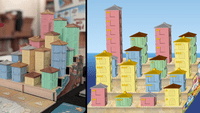
For Positano, the big challenge was to capture the 3D look and feel that people love about the game but to do so in the 2D non-dynamic world of BGA.
/pic9608849.png)
Side-by-side images of Positano in real life and Positano on BGA
The solution was to simulate the 3D hillside and buildings simply by layering images at a fixed angle. It retains the beauty of the physical game, while keeping the technical approach as basic and widely accessible as possible.
Teach Through Play
I don’t know about you, but I try to use BGA as a shortcut to avoid reading rulebooks. The tutorials are great (shoutout to Nekonyancer!), but what can be even better is when the BGA adaptation teaches players as they play.
Here are a few techniques that help to teach the game to new players:
Tooltips: When players hover over a card or other component, showing a zoomed-in display of that component, along with explanatory text, helps players to access additional information when needed.
/pic9608851.png)
In Soothsayers, players can hover over any card to view detailed information about it.
Title Bar Text & Buttons: BGA’s standard convention is to present the choices available to a player on a given turn as buttons in the title bar. To help players learn the game, dynamically update the text in the title bar and the text and icons on the buttons to best inform players of their options.
/pic9608852.png)
In Soothsayers, buttons explain the costs and effects of each action.
Player Panels: Summarizing key information within player panels, particularly scoring, reinforces for players the important metrics to pay attention to.
/pic9608857.png)
In Positano, the player panels help players to understand how each building they construct affects not just their overall scores, but provides detailed scoring for sea views, gelato, and three different public goals.
Animation: Using animation in key places can help players understand the effects of their actions and notice changes in the game state. For example, in Soothsayers, when you use the Judgement tarot to steal a Fate token, the Fate token flies from the rival’s card to yours.
How To Play Rules: Because BGA automates the setup and administrative steps between turns and enforces the rules during play, the text of the How to Play tab below the game can likely be 90% shorter than the full rulebook.
Undo
Before I started development, I asked game communities within Discord and on Bluesky what are their biggest points of frustration with games on BGA. The most common complaint was when games don’t provide the ability to undo your last action or reset your turn.
There are two main reasons for providing the ability to undo at key points:
1. New players are learning the game. After seeing the consequences of their actions, they may need to retry a few turns.
2. Errant clicks. BGA is trying to simulate the tabletop game feeling with as high of fidelity as possible, which is why it feels so bad to have your turn ruined by accidentally clicking or tapping on something and having no recourse.
Not every single action needs an undo, though. Providing too many can slow down games, and players should never be able to undo an action after hidden information is revealed.
/pic9608862.png)
In Soothsayers, after completing your turn, a Confirm button displays with a 5 second countdown before it auto-confirms. If you’re not satisfied with your turn, you can choose to reset.
Layout Considerations
The second biggest player complaint is when BGA games require too much vertical scrolling to understand the game state, so here are a few techniques to reduce the need to scroll:
Robust Player Panels: By displaying all the key information within player panels, players often can bypass needing to view opponents’ tableaus or auxiliary boards.
/pic9608863.png)
In Soothsayers, the player panels display the levels of all 8 cards in each player’s tableau, who holds the Fate tokens, coins, and the number of cards in each player’s hand.
Floating Hands: Many games demand that you play a card or tile from a hand to a tableau or place on the board. By anchoring the hands to the bottom of the screen and allowing them to float over everything else, players can always view the cards in hand when making the decision for where to play them.
Responsive Design: To accommodate players on tiny mobile screens, on ultra-wide monitors, and everywhere in between, responsive design techniques should be employed to make the best use of every screen size.
/pic9608865.png)
In Positano, the goal cards are displayed below the beach board on mobile, but when on a larger monitor, they’re displayed to the left of the hillside.
Player Preferences: We’re all different people. BGA games should reflect that by providing ample player preferences to tailor the game experience to your needs.
/pic9608866.png)
Soothsayers player preferences include options to change the card size, remove pulsing animations, and more.
Turn-Based Play
Some games work really well in BGA’s turn-based (asynchronous) play mode. These tend to be games with chunky turns, in which you’re making big moves each turn, as opposed to micro-decisions interrupted by other players. Turn-based play on BGA lets you luxuriate in over-analyzing your strategy without worrying about holding up the game.
A few techniques for making turn-based play go a bit smoother include:
Automate Non-Choices: By identifying the spots in the game in which players don’t have an actual choice to make, you can save everyone a lot of time by automating those decisions.
Provide a Robust Log: Sometimes days pass between turns, and other times players are playing multiple turn-based instances of the same game at once, so it’s important to provide a detailed, easy-to-scan log that players can use to catch up on the most recent turns.
/pic9608871.png)
In Soothsayers, the log provides small renditions of the cards drafted or played to make it easier to scan.
Simultaneous Decisions: BGA offers a mode in which players can all take their turns at the same time, which can massively reduce the amount of time it takes to complete a turn-based game.
Developing on BGA
Programming games on BGA is not easy. It takes a long time, and the documentation could be more robust. The upside is that BGA connects your game with a global audience who can compete at the highest levels.
My hope with this article is to share what I’ve learned as I strive to provide an ideal BGA experience for my own games.
I’m also hoping to start a conversation! What else can developers do to provide better BGA experiences?
Jeff Grisenthwaite is the designer of Positano and Soothsayers, both available in stores and on BoardGameArena.
Tell us how can we improve this post?